


App stores such as Google Play Store and Apple App Store collectively house more than 4 million apps, and over 1000 new apps get added daily. With consumers downloading over 257 billion apps on average every year, there is an ever-growing demand and competition for apps and games.
If you’re an app publisher with a newly launched app or planning to release one, you might be concerned about the fierce competition on the app stores. To boost your app’s ranking and engage with a high-intent audience you’ll need to optimize for the App Store and Play Store.
What is App Store Optimization?
App Store Optimization ( ASO ) is a strategic process to improve visibility of your app to your target audience in app stores such as Google Play, Apple App Store, etc., ASO involves optimizing your app page with keywords, visuals, reviews, and more, to help introduce your app to new users and influence them to download it.
Why should you optimize for the App Store?
While ASO is primarily about ranking higher in the app store result pages and outcompeting competitors, its core objective is to create brand awareness, educate consumers about your app features and highlights, and gradually drive app downloads.
Here is what developers need to understand about ASO and how it can help app’s success and monetization goals.
More Traffic, Awareness, New Audience
Besides ads and third-party promotion, app stores can become a powerful user-acquisition channel as they expose your app to millions of consumers actively looking for new apps and games.
While Google Play receives 2.5+ billion users monthly, the Apple App Store attracts about 2 Billion visitors every month. When you rank higher in your app category, your visibility increases helping you land more users through downloads.
With improvement in your app’s rating, downloads, engagements, etc., app stores become a significant organic traffic-driving channel for your app, complementing your other marketing and promotional activities.
While ads and other marketing channels come at a cost, ASO is free. It is an ongoing practice that allows you to leverage existing demand and make your app more visible to target users.
App Downloads & Conversions
ASO primarily deals with increasing the discoverability of an application. However, all ASO best practices directly impact your bottom line i.e., app downloads.
From optimizing your metadata to gathering user reviews, ASO equips your app page to draw visitors and convert them into users.
Irrespective of how users find your app, be it through ads, social media, or organic search, ASO enables you to educate new users, gain their trust and lead them to download.
Credibility & Proof
Social proof and user rating are two influential factors that significantly impact conversion rate. Research hints that 80% of mobile users consider app rating before downloading an app, and improving your app rating from 3 to 4 can boost the conversion rate by 90%.
As reviews, ratings, and downloads are three pillars of an App Store’s ranking factors, it allows your app page to act as a trusted source for new or potential users. Bringing them a few steps closer to conversion.
App Store Optimization helps with visibility, downloads ( conversion ), new customer acquisition etc., and collectively enables you to improve your app and expand your user base.
Factors Impacting App Ranking in Google Play Store and App Store
Google Play and Apple App Store are the most popular app stores, catering to over 190 and 175 countries, respectively. The ranking factors of these app stores are quite similar, with trivial changes. Here are all the common and important ranking factors of apps in app stores.
- App Name or Title – One-word app introduction
- App Subtitle – One liner about the app ( Only applies to Apple App Store )
- App Description – Short and long summary of the application
- Reviews and rating – Users’ thoughts, experience, and feedback
- Downloads & uninstalls – Indicates how many people have installed and uninstalled the application
- Visuals – Images, previews/videos, screenshots of the app
- App updates – Informs about recent changes to the app
- Localization – optimizing the app page for locations based on regional and cultural preferences.
While a few factors may change depending on the platform, the above factors broadly apply to all app stores, especially Google Play and Apple App Store.
6 Steps to Make Your App Rank-ready for Google Play Store and App Store
If you have recently launched your app or game on the app store and are overwhelmed by ASO best practices, here are simple 5 steps that you should follow.
Step 1: Keyword Research & optimization
It is essential to know what your target audience is searching for. this allows you to optimise your app for the exact search term. Once you’ve identified the key search terms, add them to your app page’s title and meta description to improve your chances of ranking for these search queries.
If you’re launching a new app on the app store, name your application based on the key terms the target persona uses to find apps in your category.

For example, most people who search for cooking games often use the term “cooking” to find relevant games. Using a variation of the seed keyword in your app name allows you to integrate keywords naturally. For instance, app names such as Cooking Fever, Cooking Madness, Cooking Rage, etc., have used their seed keywords.
You can find the seed keyword with tools such as Semrush, Ahrefs, AI keyword inspector for ASO, App Radar, App Tweak etc. Further, you can use the app store search auto-fill to find related keywords.
While the first thought when selecting keywords could be to target high search volume key terms, you must understand that it also comes with high keyword difficulty. Like you, many competitors will be competing to rank for those keywords. Hence, initially, when you’ve launched a new app, target keywords with good search volume but less keyword difficulty.
Step 2: Competitor Research
Competitor analysis helps you narrow your keyword research and find relevant terms related to your app category faster. Instead of conducting keyword research from scratch, you can leverage the existing keywords your competitors use in their metadata to conduct keyword research.
Analyze the following factors while conducting competitor analysis:
- Key terms used in metadata
- How many times a keyword is used
- How did they use these keywords
- How did they optimize other ASO ranking fields
- What are their downloads and engagement metrics
- When did they roll out the last update
- Patterns and flow followed in the metadata copy
- Look at the types of visuals they’ve used. Pay more attention to videos and previews
This extensive analysis will help you discover your competitor’s best practices that drive conversion for their app and the factors that influence their ranking. While you can compare your app page with your competitors’ to find the ASO gaps and plan your optimization accordingly, it is equally essential to find areas where you can improvise.
Step 3: Optimize Meta Data
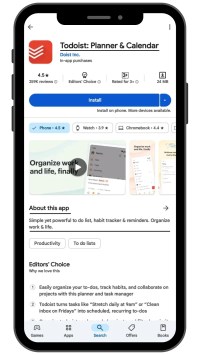
Start optimizing the app title, description, and subtitles (collectively called metadata) using the keywords you finalized in the first two steps.
- App name or title – Use a unique header that relates to your app and category.
Eg: Todoist: Planner & Calendar.
- Description – You need to convince visitors that your app is worth trying in 253 characters, as more than 80% of the visitors only read 10% of the page content and rarely click the see more option to read the full description. Hence, avoid keywords and convey your app’s benefits and use case according to the flow of the content.
Eg: Todoist: Simple yet powerful to-do list, habit tracker & reminders. Organize work & life.
- Subtitles: Add a one-liner or 2 or 3 words that describe your app precisely. The subtitle field is only available in the Apple App Store.
Eg: Todoist: To-Do List & Calendar | Planner & Reminders
Copywriting is the core of optimizing metadata. Write short, persuasive and clear points highlighting your app features, functions, and how they cater to users’ desires and goals. Ensure that location-relevant key terms and descriptions are added to cater to different audiences. While the title and subtitle bring users to your app page, the description takes them one step closer to further exploring your platform.
Step 4: Visuals

Visuals provide a sneak peek of the basic features and use cases of your application to users without needing to download it.
In the Google Play Store, you can add 8 images and 1 video. Whereas the Apple App Store can showcase one preview video and 10 images. You can hook your target users with a concise preview video summarizing your app’s capabilities while images highlight the use cases and unique features.
One thumb rule is that all the images on your app page should be compatible with all screen sizes and of high quality. These visuals familiarize visitors with your app and allow you to make a solid pitch to boost downloads.
Step 5: Reviews & Ratings

Reviews and ratings are another ranking factor that significantly impacts visibility and conversion. You can gather this customer feedback from your existing users by prompting them to drop a review on the app store in exchange for rewards or after a positive in-app experience.
While Google Play has not explicitly set a limit to request reviews from users, Apple App stores allow you to send review requests only thrice every 365 days.
Reviews and ratings influence the audience’s impression of your app’s credibility and capabilities. Hence, it can directly influence the user’s course of action. That’s precisely why you should be active in your feedback sections by replying to both positive and negative reviews.
Step 6: Experiment & Monitor
While the above steps allow you to optimize your app listing, you need to experiment with different combinations of keywords, metadata, visuals, icons, etc., and find a version that works best for your visitors and drives downloads.
As you document these experiments, you can understand which changes influence your app position and the combinations that convert more visitors to users. Further, keep track of your competitor’s ASO efforts to know how they are attempting to improve their metrics.

If you’ve recently launched your app, start with these steps to equip your app page to initial visitors. As your review, rating and downloads grow, you can see a significant change in your app position in app stores.
Frequently Asked Questions
What are the differences between App Store and Play Store?
Apple App Store is built for iOS users, whereas Play Store is for Android. While both app stores share similar ranking factors, there are a few trivial differences that make the ASO different for both platforms.
What are the Best Tools for App Store Optimization?
Mobile Action, Sensor Tower, Data.ai, AI keyword inspector for ASO, App Radar, App Tweak, etc., are a few apps you can use for ASO.
What is the difference between App Store Optimization and SEO?
SEO, popularly known as Search Engine Optimization, helps webpages rank higher in the SERP, whereas ASO is related to boosting app page ranking in app stores such as Google Play and App Store.


